Navigating Pyraxis Workspace
Pyraxis 101 · updated 2026-07-10
Getting to Know the Pyraxis Workspace
Pyraxis is designed to keep everything you need within easy reach, helping you stay focused on your work instead of switching between countless applications.
Here's a quick tour of the main areas of the Pyraxis workspace.
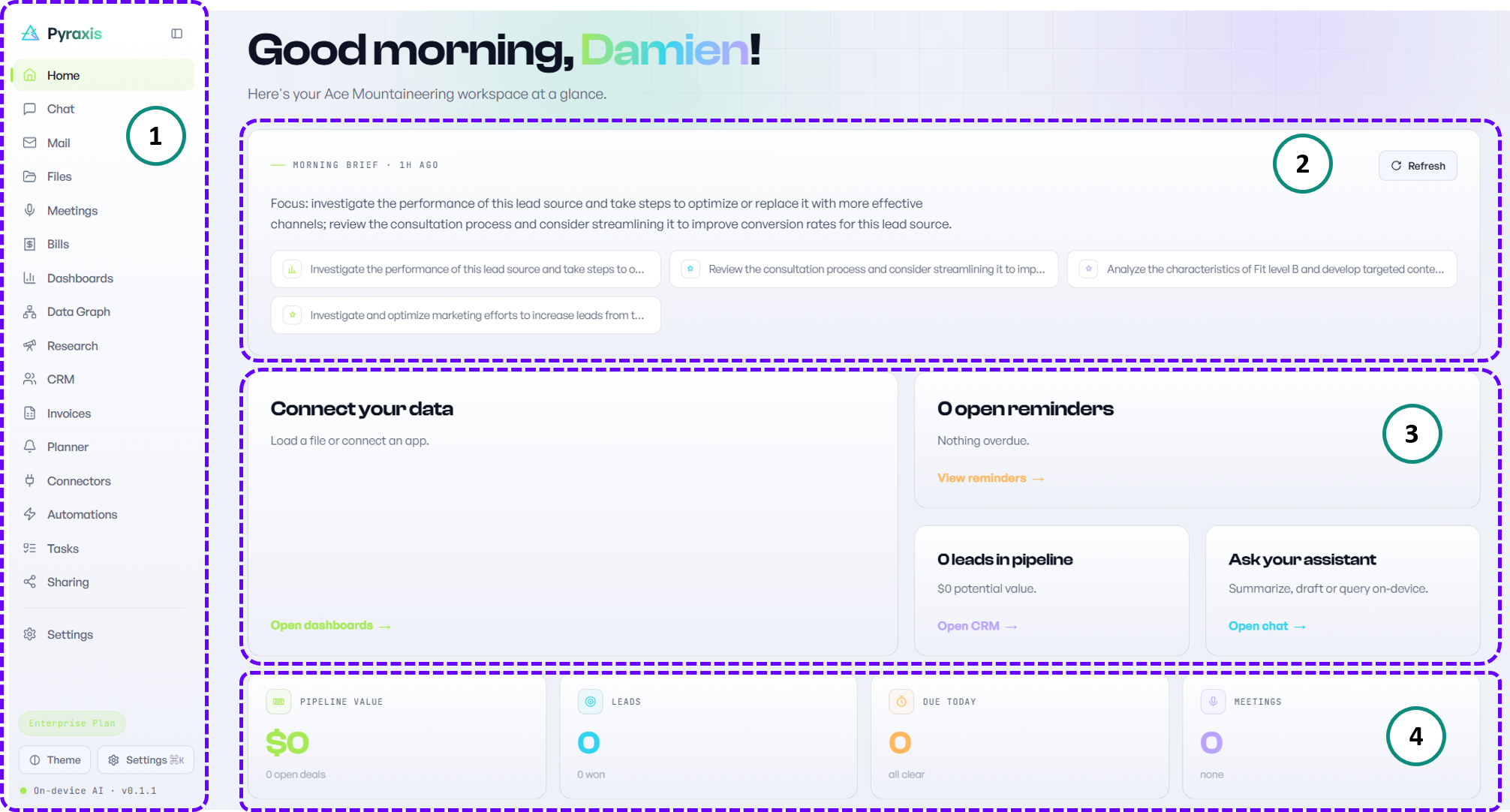
1 | Side Panel - Your command center. It provides quick access to all of Pyraxis' features and workspaces. Whether you're managing documents, chatting with your AI assistant, creating dashboards, or automating workflows, everything starts here. |
2 | Focused Zone - Stay focused on what matters most. This is your personalized workspace where Pyraxis highlights the most important items requiring your attention. Everyday. |
3 | Reminders - Never lose track of what's next. Located right below the Focused Zone, the Reminders pane provides a quick snapshot of upcoming activities and ongoing work. |
4 | Performance Cards - Turn your data into insights. It give you an instant overview of the metrics that matter most. Whether you're tracking business performance, sales, projects, finances, or personal productivity, Pyraxis transforms your data into meaningful visual summaries that are easy to understand. |